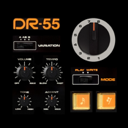
 CR-8000
 CR-5000
 DRM-16
 DRM-32
DR-55 2.1 for iOS 15, iPadOS 15 and macOS 122026-11-13
What you get
- Audio Unit (AUv3)
- Load DR-55 as an instrument inside GarageBand, AUM, Cubasis or Logic. Its front panel appears in the host window, its tempo follows the transport and its state is saved with your session. Seven separate outputs — the full mix and each instrument group — and fifteen automatable parameters.
- MIDI output
- Every hit is sent as a General MIDI drum note, accents included, to your other apps, your MIDI interfaces, Audiobus and the Audio Unit host. The channel is chosen in the options panel.
- Audiobus 3
- Updated to the latest SDK, with a MIDI port alongside the audio port, remote Start/Stop triggering and the complete state of the machine saved in your Audiobus presets.
- Mac version
- Included in your purchase: a window in the proportions of the machine, menus, keyboard shortcuts, and knobs you turn with the scroll wheel or the trackpad.
- Built-in options panel
- Every setting now lives inside the app, in a panel styled like the machine itself. On iPhone the sections stay reachable at all times and each page fits the screen, with no scrolling and no zooming. The iOS Settings remain available and the two stay in step.
- Output limiter
- No more clipping on busy patterns.
- Eight rewritable memories
- The eight patterns of the machine are yours to rewrite, each with its A and its B variation. They leave the factory filled with the eight rhythms of the original manual, and the options panel puts any of them back, one memory at a time.
Main screen
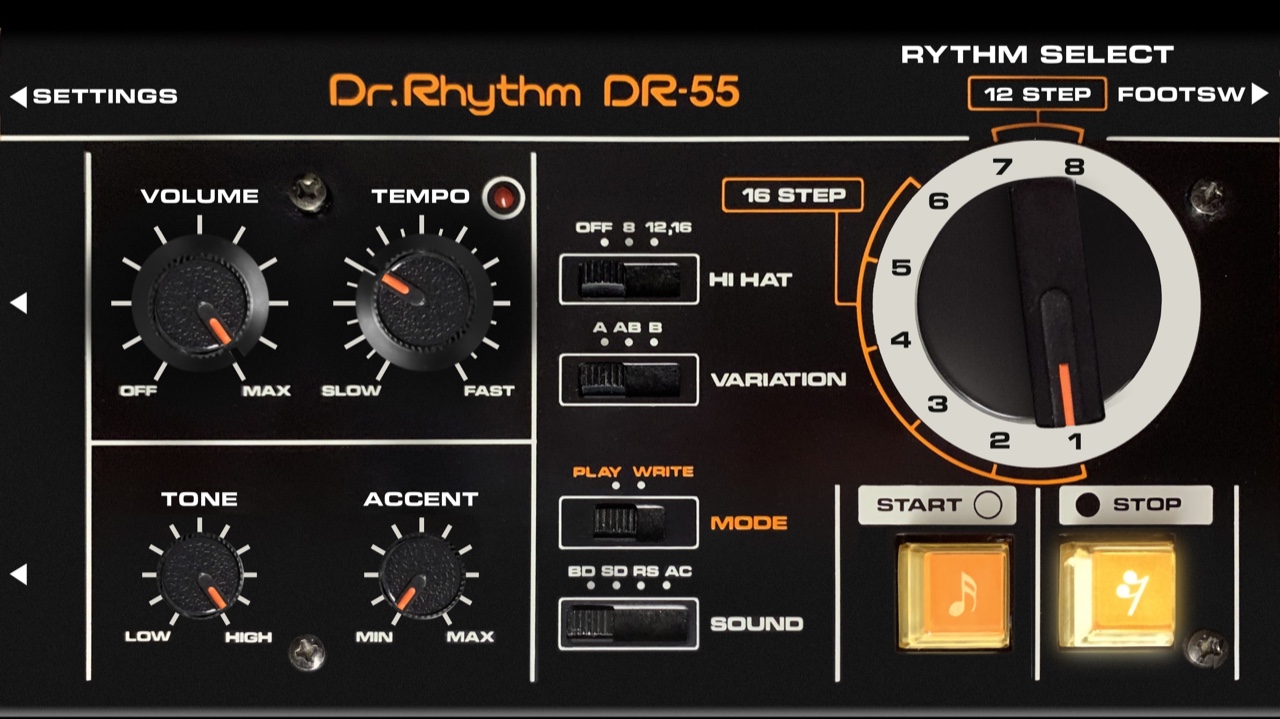
Usage (commands from top to bottom and from left to right)
- Settings shortcut
- Use the « SETTINGS » marking in the top left corner to open the options panel of the machine, laid out like its own front panel. Effects, drum kit, muted instruments, memories, MIDI output and Bluetooth foot switch are gathered there, as described in the « Settings » chapter of this page. The matching section of the iOS Settings remains available, and the two stay in step.
- Foot switch shortcut
- Use the « FOOTSW » marking in the top right corner to go straight to the Bluetooth pedal page of the options panel, where the Start / Stop function is taught to your foot switch.
- VARIATION switch
- Use this switch to choose which of the two patterns of the selected memory is played: A on its own, B on its own, or AB to alternate them one bar after the other. The change is heard immediately.
- VOLUME control
- Use this rotating knob to adjust the main output volume of the machine. Rotating a knob is done by pointing at it: the knob turns to face your finger, then follows it.
- TEMPO control
- Use this rotating knob to adjust the tempo of the machine. Alternatively, you can tap the rhythm of measures on the knob to set the tempo. The calculation is based on a 16 steps average.
- TONE control
- Use this rotating knob to darken the hi-hat. It is a low-pass filter placed behind that instrument alone: fully clockwise the sound is untouched, fully counter-clockwise it is matt and dull, and the whole course in between is usable.
- ACCENT control
- Use this rotating knob to adjust how much louder the accented steps are played. The accents themselves are written into the pattern, on the ACCENT line.
- Rhythm selector
- Use this large rotary selector to choose one of the eight memories, for playback or for writing. The selector is mechanical: it is always on one of its eight positions.
- MODE switch
- Use this switch to choose between PLAY, which loops the selected memory, and WRITE, which lets you lay a pattern down step by step. Switching to WRITE stops the machine.
- SOUND switch
- Use this switch to choose what the two buttons write in WRITE mode: the bass drum, the snare drum, the rim shot, or the accent line.
- HI HAT switch
- Use this switch to add the hi-hat to your rhythm: OFF, eighth notes, or sixteenth notes. It is not written into the memory and it plays under every pattern, A and B alike.
- Music note button
- In PLAY mode, use this button to start the machine; pressed again while it runs, it takes the pattern back to its first step. In WRITE mode, it writes a hit of the selected instrument on the current step and moves one step forward.
- Rest button
- In PLAY mode, use this button to stop the machine. In WRITE mode, it writes a silence on the current step and moves one step forward.
- Tempo indicator
- In PLAY mode this red LED beats the quarter note while the machine runs. In WRITE mode it marks the first step of the line being written, and lights again each time the whole pattern has been walked through.
Settings
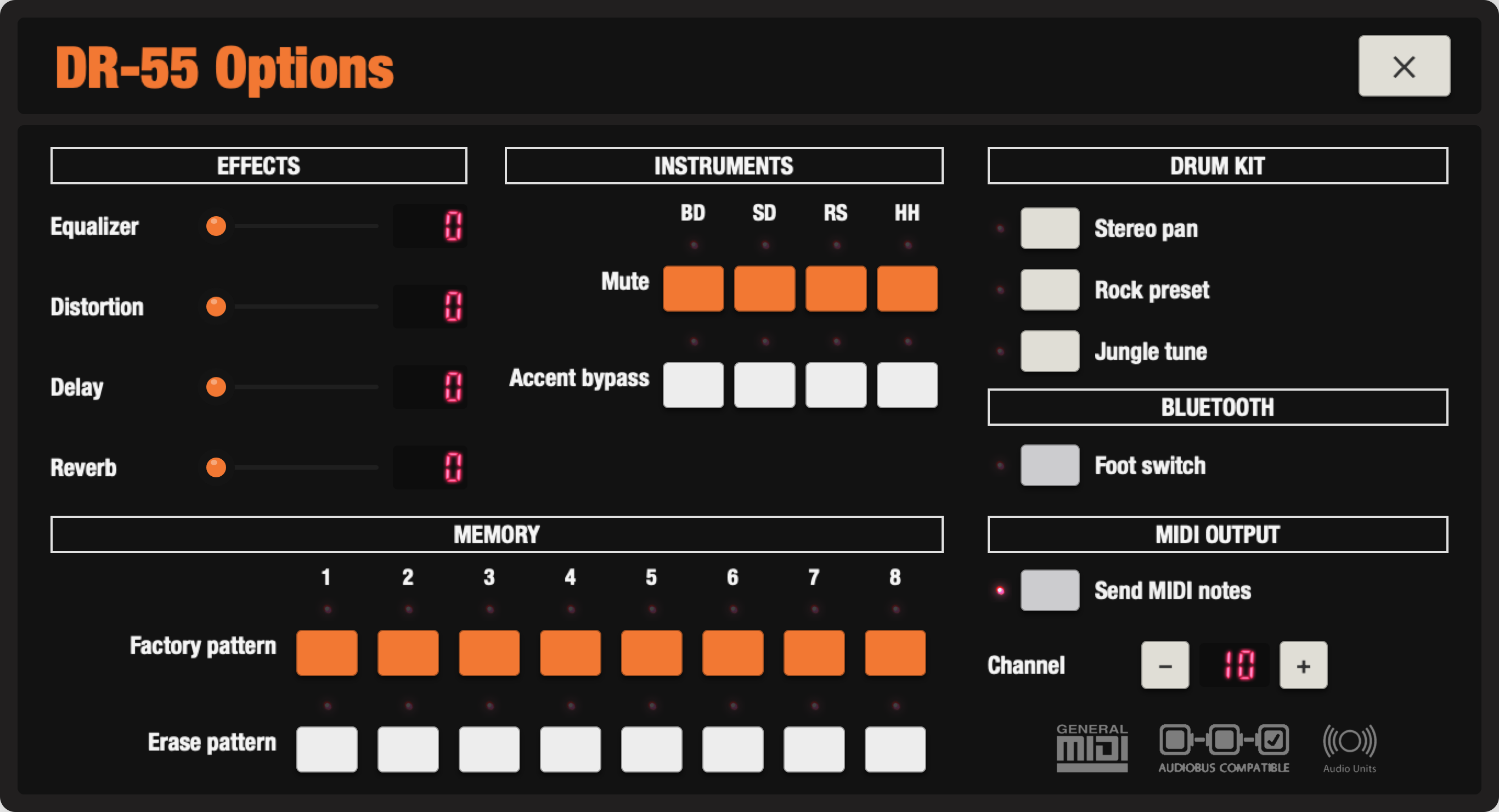
Usage (option switches from top to bottom)
- Equalizer
- Off : Bypass.
On : Basses and trebles are boosted and mediums are reasonably positionned. Best for lo-fi devices. - Distortion
- Off : Bypass.
On : A distortion effect is applied to the drum machine main output. - Delay
- Off : Bypass.
On : A delay effect is applied to the drum machine main output. The length of this effect is sychronized to the tempo, which in a way, produce new richer patterns with secondary discrete shots. - Reverb
- Off : Bypass.
On : A reverberation effect is applied to the drum machine main output. - Mute
- Gives access to a detailed list of instruments.
For each of them :
Off : The instrument is played.
On : The instrument is muted. - Accent bypass
- Gives access to a detailed list of instruments.
For each of them :
Off : The instrument velocity is affected by the accent events bundled in presets or added within your programs.
On : The instrument velocity is not affected by the accent events. - Stereo pan
- Off : Bypass.
On : Each instrument is balanced to the right or left in a logical and harmonious way. - Rock, pre-processed effects
- Off : Bypass.
On : An alternative kit is used while in playback. Each instrument is been reprocessed independently through several effects to provide a higher general dynamic result. - Jungle tune
- Off : Bypass.
On : Each instrument height is affected in a -2 +2 octaves range to provide an alternative tone to your creations. - Factory pattern
- One small button for each of the eight memories. Press it once: its lamp lights and the row asks « Confirm ? ». Press it again and the memory goes back to the rhythm it left the factory with, its A pattern and its B variation. Without an answer, the question withdraws after three seconds.
- Erase pattern
- One small button for each of the eight memories. Press it once, confirm, and the memory is emptied: no hits, no accents, a clean page to write on.
Usage (option switches from top to bottom)
- Bluetooth LE Midi
- Gives the possibility to have the « Start / Stop » function triggered by a Bluetooth Low Energy control pedal.
Off : Function turned off. Better when not in use, to save your device autonomy.
On : Function turned on. Activate the Bluetooth function on your device and your foot switch, DR-55 automatically connects to the first Bluetooth LE peripheral around. Press and hold « Start / Stop » in the panel until it asks for the pedal. Actuate the desired command on your foot switch, DR-55 associates it permanently with the selected function. The subsequent pairing of this same device is automatic. - Send MIDI notes
- Off : No MIDI is sent.
On : Every hit leaves as a General MIDI drum note on the chosen channel, accents included.